
9: Traffic Light
This project uses three LEDs to copy the pattern of a traffic light.
This is a real-world sequence: the LEDs turn on in a repeating order with different timing. You are practicing how code can control multiple outputs step-by-step.
Coding ideas you will use:
- multiple output pins (one per LED)
- an infinite loop to repeat the pattern
- timing with
time.sleep
Learn more (optional):
Goal
Make red, yellow, and green LEDs turn on in a repeating pattern.
Parts you need
- 3 LEDs
- 3 resistors
- jumper wires
- breadboard
- RP2040-Zero
Important: choose the right resistor
Your kit has 150Ω and 100Ω resistors.
- For a red or yellow LED, use 150Ω
- For a green, blue, or white LED, use 100Ω
Using the wrong resistor can damage an LED.
Wiring idea
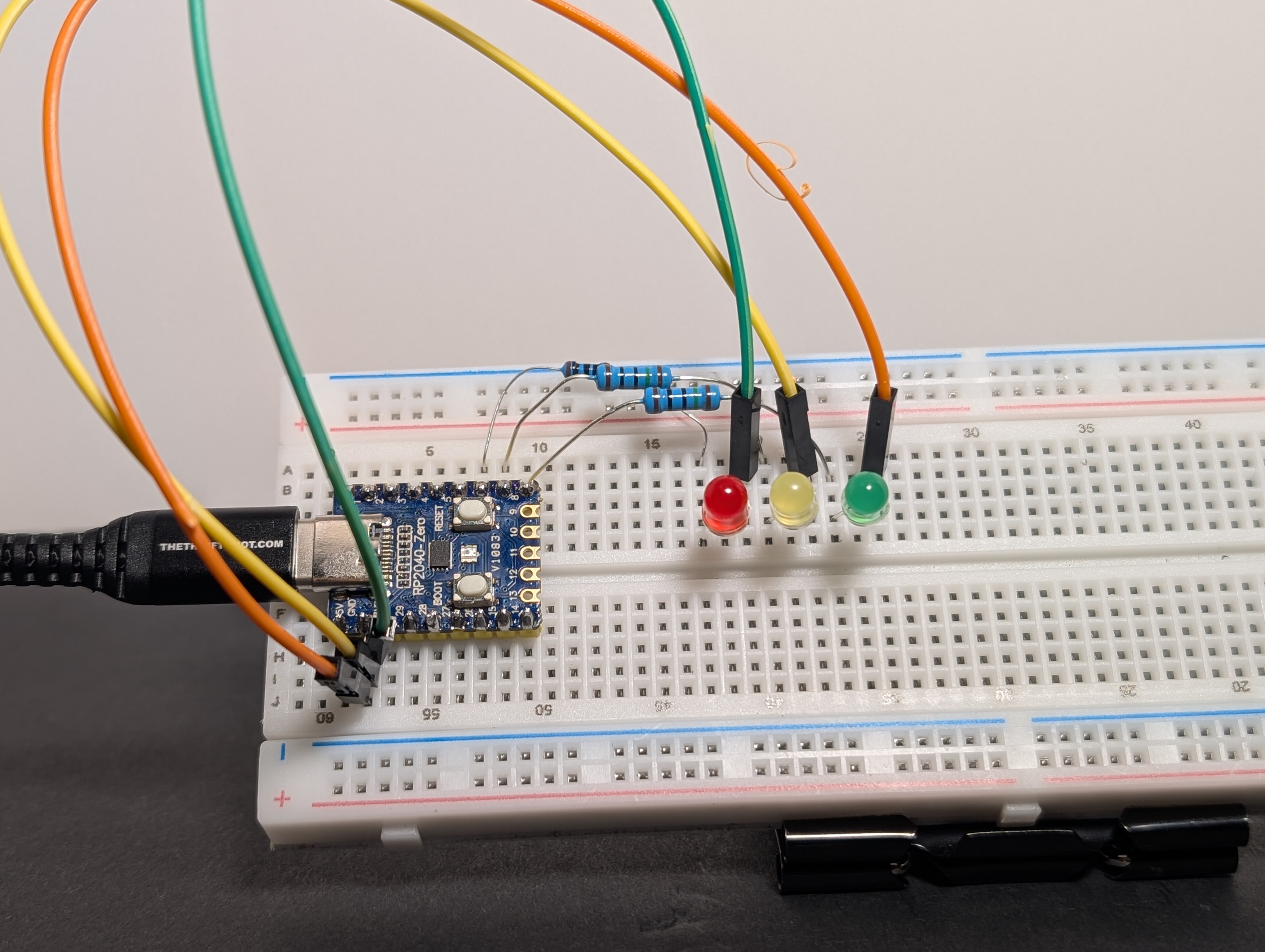
Build it first, then compare your setup to the diagram. Did you connect each part to the pin you meant to use?
Connect each LED to its own GPIO pin.
Each LED should still have its own resistor and its own path to GND.
Example pins: GP6 (GPIO 6), GP7 (GPIO 7), and GP8 (GPIO 8).
Hint
The circuit is the same as what you built in 7: LED Chase, but with red, yellow, and green LEDs.
Code
Pin reminder
Wired your LEDs to different GPIO pins? Update RED_GPIO, YELLOW_GPIO, and GREEN_GPIO in the code below to match your wiring.
import machine
import time

RED_GPIO = 6
YELLOW_GPIO = 7
GREEN_GPIO = 8

# Pin mapping
red = machine.Pin(RED_GPIO, machine.Pin.OUT)
yellow = machine.Pin(YELLOW_GPIO, machine.Pin.OUT)
green = machine.Pin(GREEN_GPIO, machine.Pin.OUT)

print("Traffic Light Sequence Starting...")

while True:
    # 1. GREEN LIGHT (GO)
    green.value(1)
    time.sleep(3.0)  # Longest time
    green.value(0)

    # 2. YELLOW LIGHT (CAUTION)
    yellow.value(1)
    time.sleep(1.0)  # Short warning
    yellow.value(0)

    # 3. RED LIGHT (STOP)
    red.value(1)
    time.sleep(3.0)  # Longest time
    red.value(0)
Arduino Code Coming Soon
What to notice
- One board can control many outputs
- Each output needs its own pin
- The code decides the order and timing